Case study · SDC Container LLC · Roll-off dumpster rental, Massachusetts
A dumpster rental website that books the job.
SDC Container’s old WordPress site ran three booking plugins and still could not take an order. Now a customer books and pays for a roll-off dumpster online in about a minute, the order lands on a private dispatch board, and the drivers get their day on a phone. Orders went up 58.7% and stayed there.
Greg at Knowledge Designs is a top tier producer. From day one he has been responsive, meticulous, and gone above and beyond with our best interest in mind. SDC Container LLC would not be where we are today without Knowledge Designs and we are grateful for the hard work he does for our company day in and day out. I highly recommend Greg for any website, IT, or marketing strategy services!
What changed
Three of these you can check on the live site. The order figure comes from SDC Container’s own Stripe data, which is why it is a percentage rather than a count.
+58.7%
Orders
Above the pre-launch level, and held there for more than two months.
3 → 1
Booking systems
A page builder, a rental plugin and a scheduler replaced by one page.
0 → Live
Online ordering
The old site could not take an order. Now it books and takes payment in four steps.
0
WordPress plugins
No plugin updates, no rental add-on license, no scheduler subscription.
The problem
Three booking plugins, zero online orders
The old site looked finished. Underneath, a page builder, a rental plugin and an appointment scheduler each held one piece of the job, and none of them could carry a customer from “I need a 15-yard on Thursday” to a paid order. Every job ended in a phone call to a man who spends his day driving a truck.
The scheduler was the tell. It was built to book a person’s time in slots. A dumpster company books a container of a certain size, on a date, for a term, at an address, with a spot to drop it. Forcing one shape into the other was the whole problem, and no plugin was going to fix it.
What we built
Book a dumpster online in about a minute
- 1Size10, 12, 15 or 20 yard, each with a real price rather than a range
- 2Term3, 7 or 14 days
- 3Date & windowthe delivery day plus a morning or afternoon window
- 4Details & payaddress, where to drop it, card on Stripe
-
KNOWLEDGE
DESIGNSWe built the booking page, the site, the dispatch app and the local SEO behind it, and we support all of it day to day.
Start a conversation →
One page, no reloads, and a running total that updates the moment anything changes. The card form is Stripe’s, so card numbers never touch the website. When a payment clears, Steve gets an email work order with the date, the window, the container, the address and the placement notes already on it.
If a price changes, he changes it once, from his phone, and the whole site follows. There is no WordPress under any of this and nothing to patch on the second Tuesday of the month.
The result
Orders up 58.7%, and it held
Once the booking page was live, orders settled at roughly 58.7% above the pre-launch level and stayed there, measured across two-week periods for more than two months from Stripe data.
Indexed rather than absolute: the underlying order counts are SDC Container’s commercial data. Figures available on request.
Two honest notes. The old site could not take an order at all, so part of that lift is jobs that were always there and were being lost after hours. And the booking page launched alongside a rebuilt site, local SEO for the towns SDC serves, and ongoing support, so the number belongs to the combination, not to one button.
Behind the counter
From paid to picked up: the dispatch app
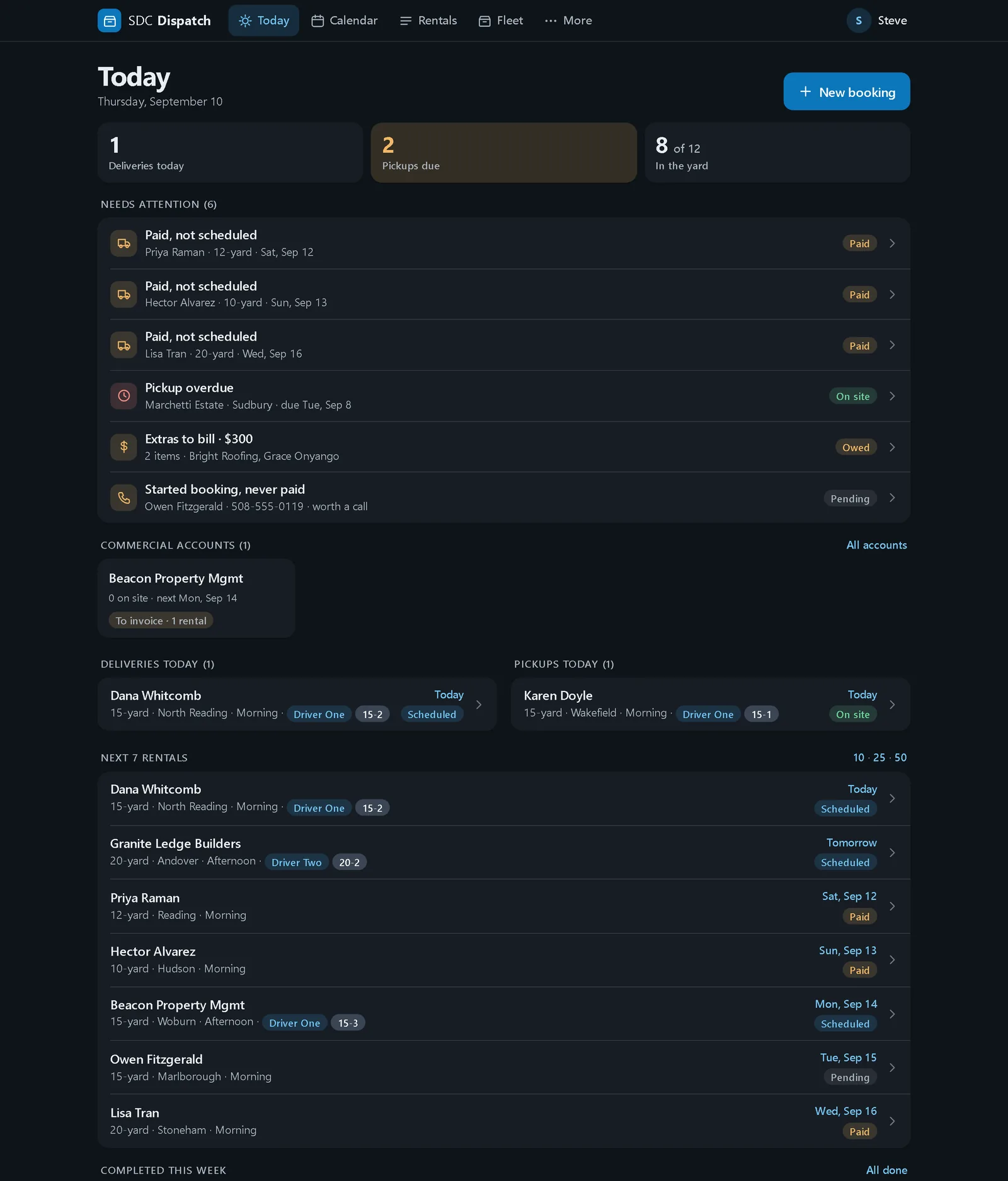
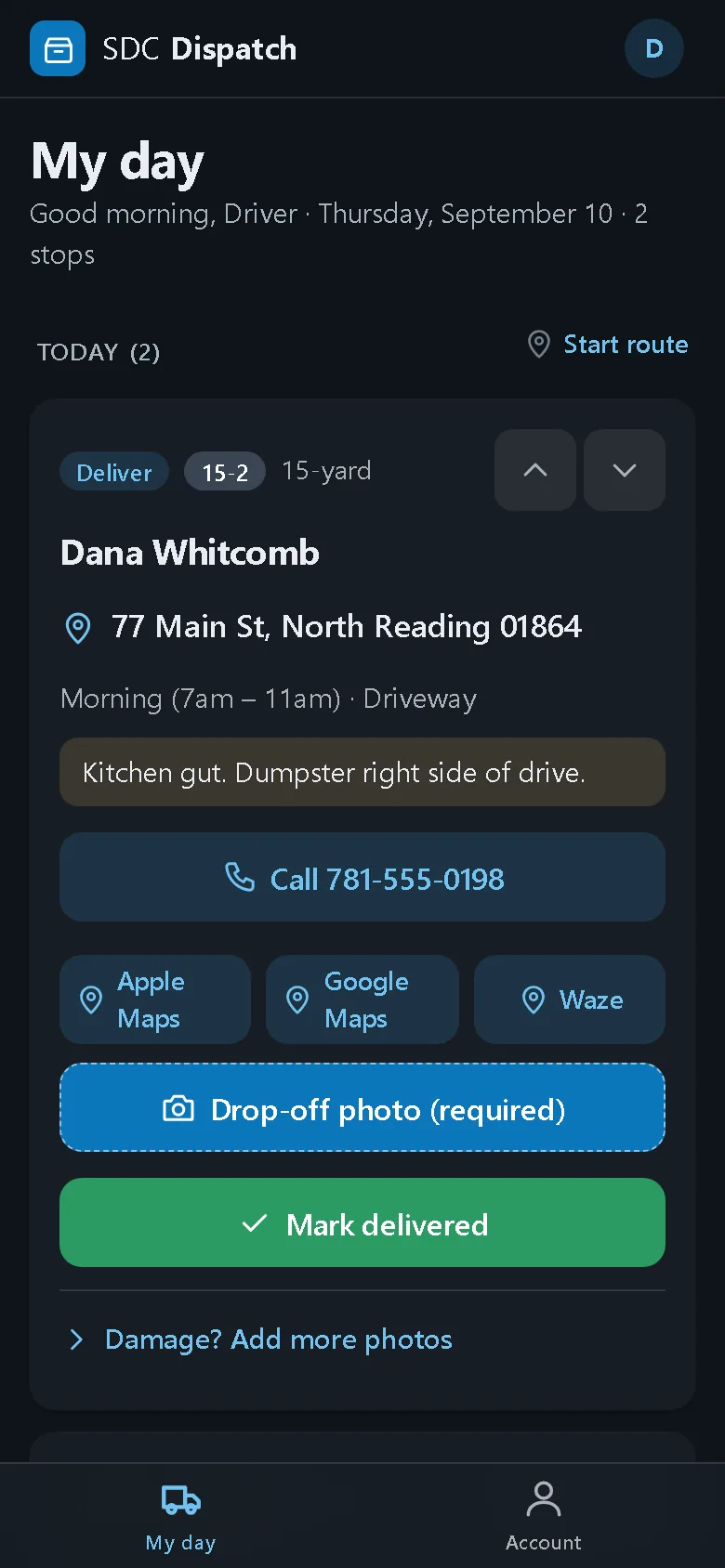
Taking the order is half the job. The other half is getting the right container to the right driveway on the right morning, and back again, without a whiteboard and a stack of sticky notes. So we built SDC its own dispatch app: a board for the office and a phone app for the drivers. It runs on hosting we manage, with no per-seat license, and it talks to the website both ways.
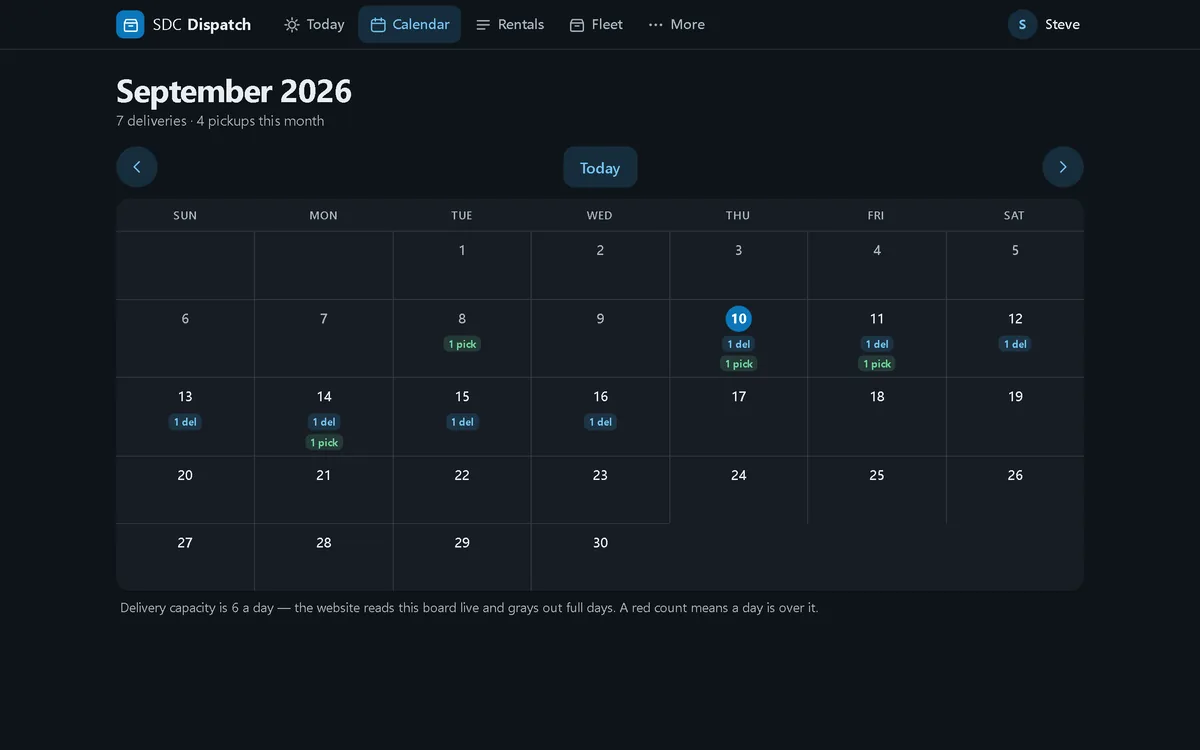
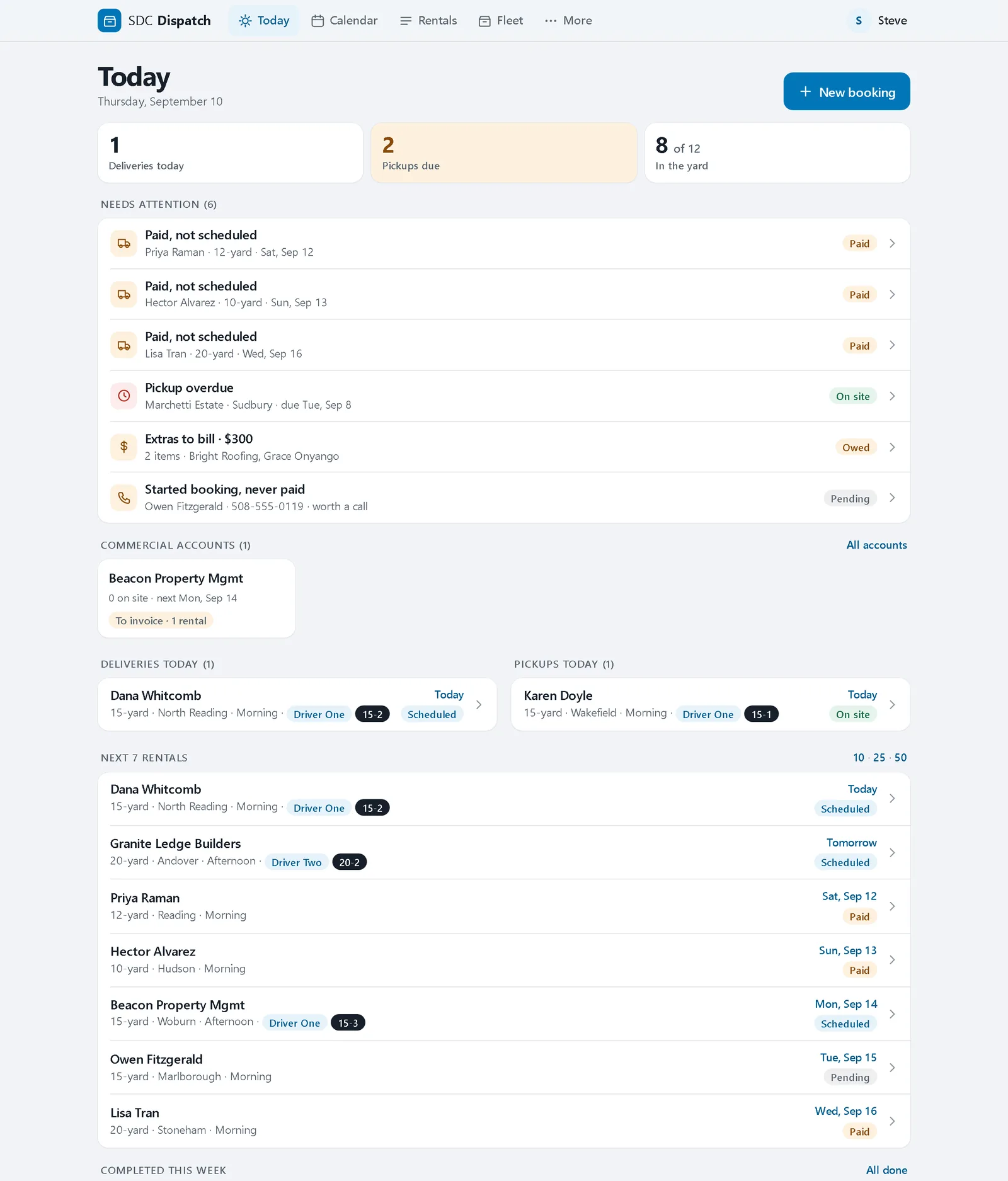
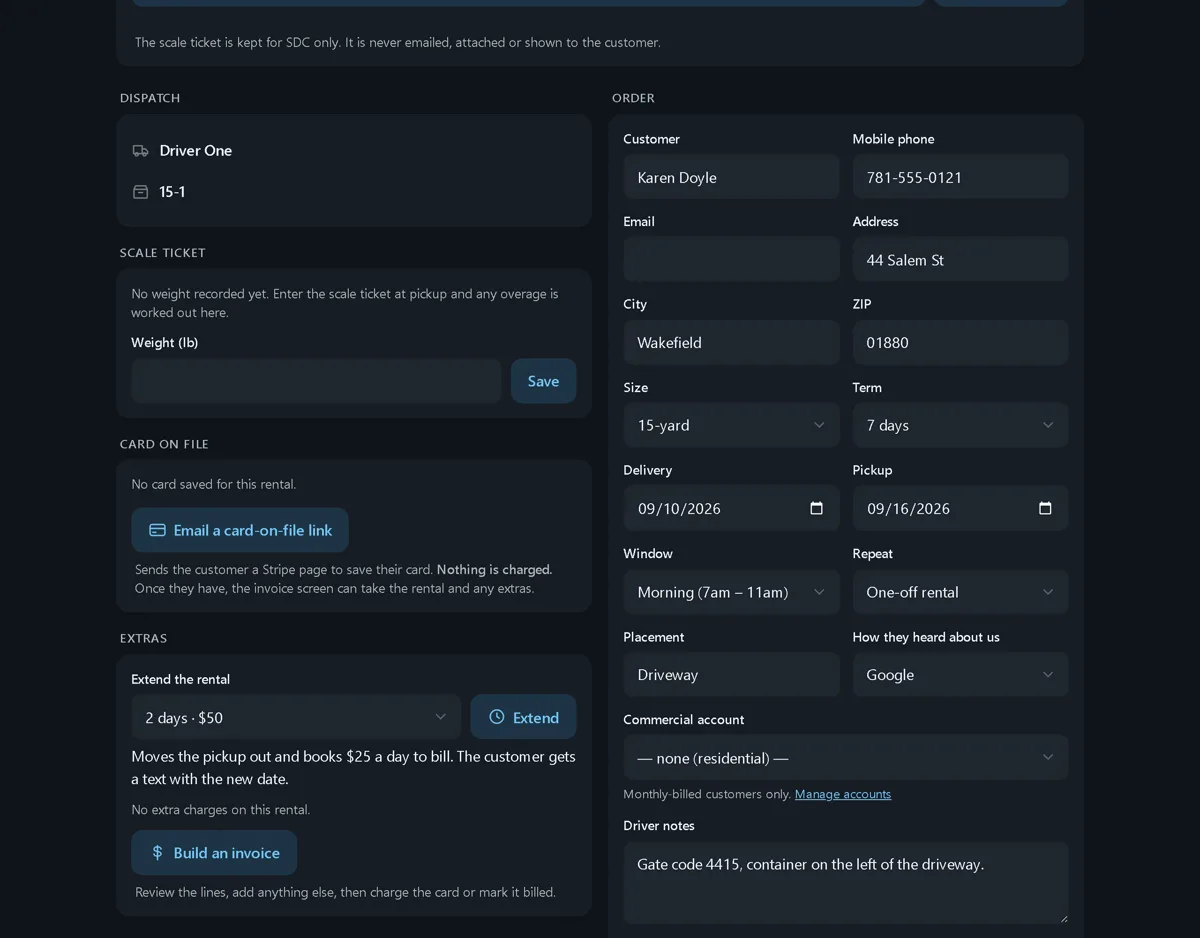
- A paid booking lands on the board by itself, with the delivery and the pickup already on the calendar.
- The office sees the day at a glance: deliveries and pickups due, anything paid but not scheduled, anything overdue, and the people who started a booking and never paid, which is a call worth making.
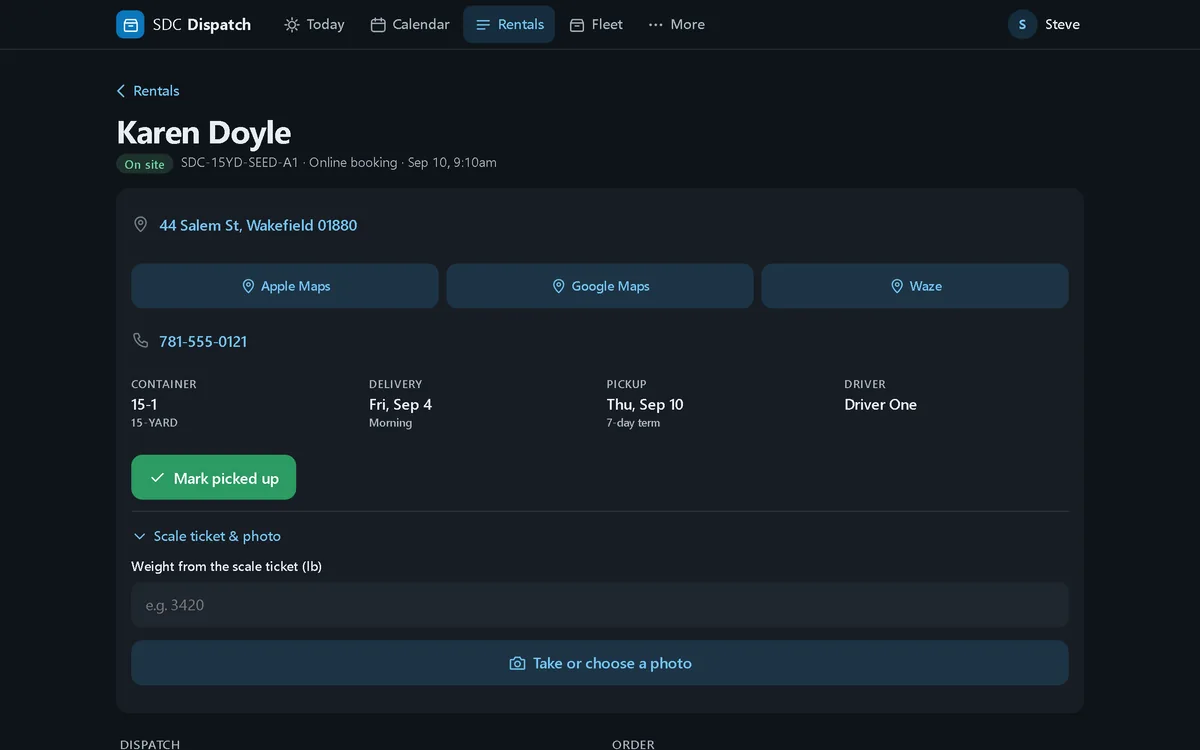
- Each driver gets only their stops, with the address, the placement notes, a Call button, and directions that open in Apple Maps, Google Maps or Waze. A photo is required before a stop can be marked done.
- The scale ticket goes in once and any overweight charge is worked out from it. Extra days, swaps and commercial accounts each have a to-bill list, and payments flow into QuickBooks against the right accounts.
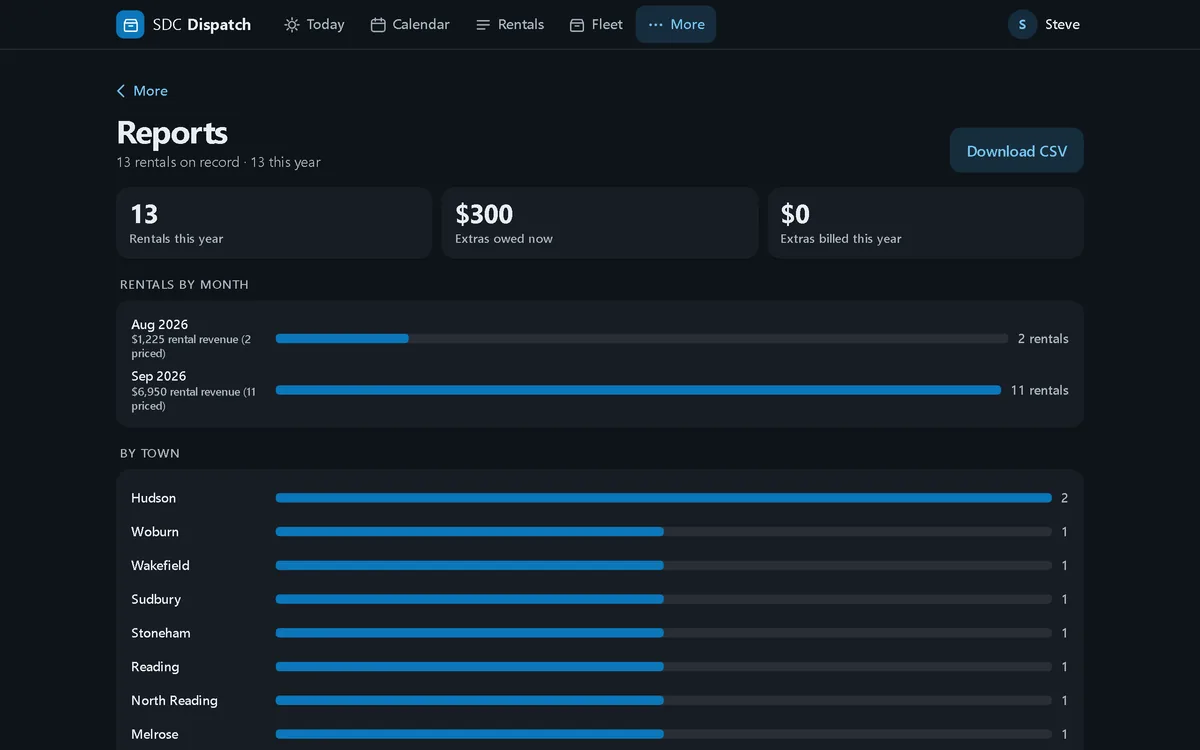
- The website reads the board live, so a full day is grayed out before anyone can book it. Reports run off the same data: by month, by town, by size, and how customers said they found SDC.
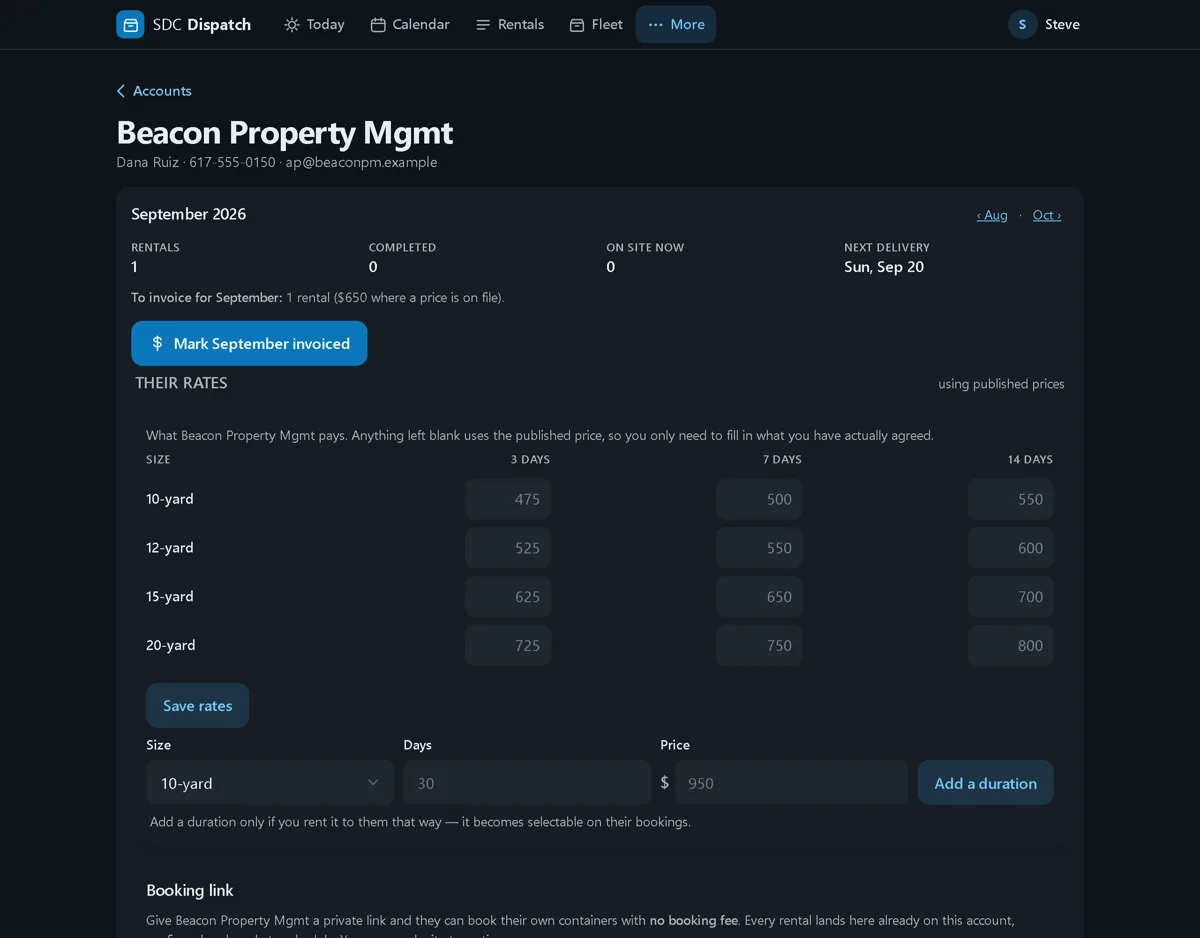
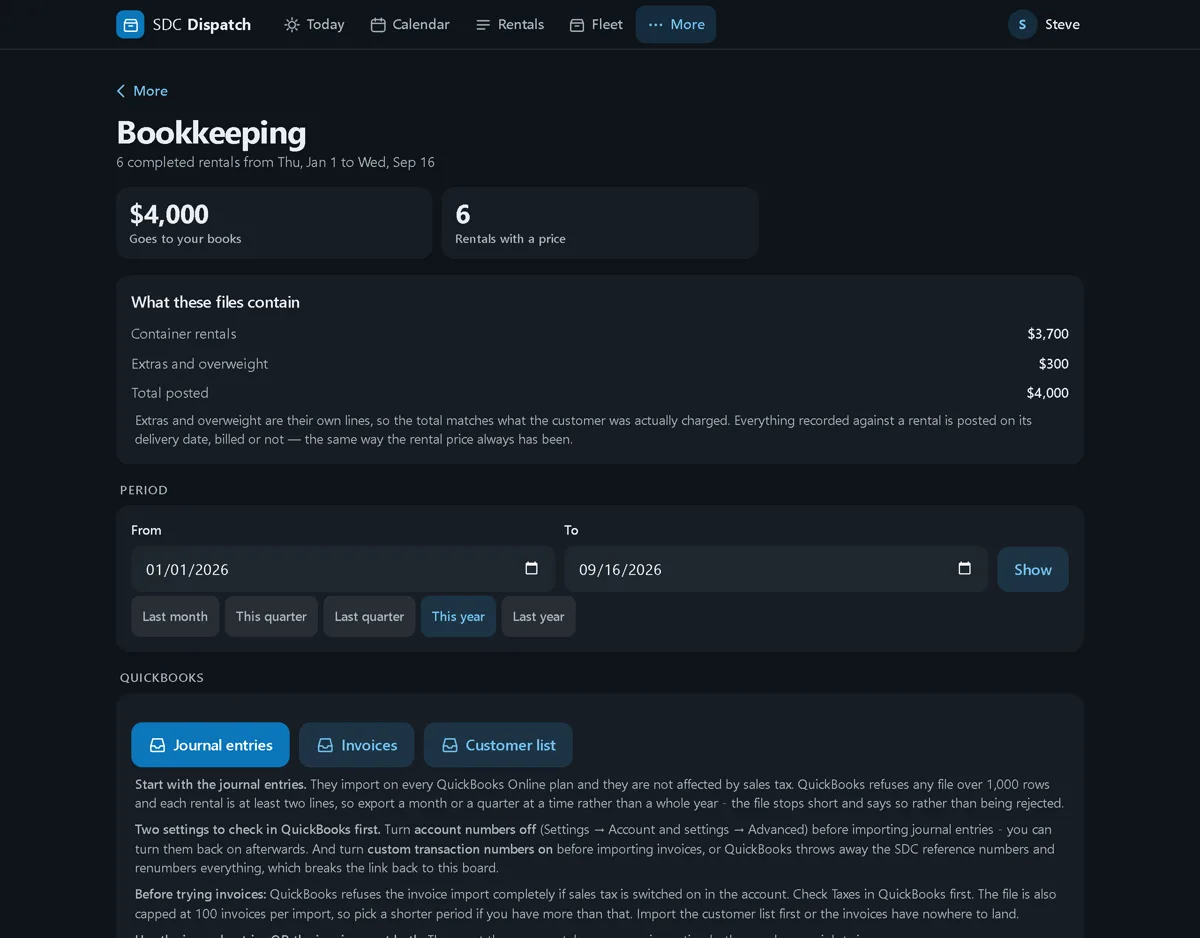
It sits at its own address behind a login, is not linked from anywhere public, and tells search engines to stay out, which is why there is no link to it here. The screens below are the real app with sample data, not real customers. Dark mode is the one the office runs; light mode is a tap away.
Since launch · updated September 2026
What the system has gained since the first version
A booking system is never finished, because the business keeps finding the next thing it wants to stop doing by hand. This is what the dispatch app and the website picked up in the first months, each one asked for by the people using it.
- The customer hears from the app. Six emails go out on their own: a booking confirmation carrying the exact terms the customer agreed to and when, then scheduled, delivered, a pickup reminder, picked up with a request for a Google review, and extended when they keep it longer. Nobody types them.
- Every dollar has a line. A payments ledger records the booking fee, the rental, extras and overweight against each rental, sends one itemized receipt, and shows anything still owed. Nothing charges itself: Steve reviews and confirms every charge in two deliberate presses, and drivers cannot charge at all.
- Commercial accounts book without the fee. Each account gets a private booking link, its own rates by size and term, and a month view with one button to mark it invoiced.
- QuickBooks gets the extras too. Journal entries and invoices export with rentals, extras and overweight as separate lines, so the books match what the customer was actually charged.
- The crew’s day, for the office. Each driver’s stops in order, photos grouped by stop, and a timeline of what was marked when. It reports the last stop marked; it does not track the truck.
- Hazardous material has a button. A driver who finds asbestos or anything else that cannot be hauled flags the stop with photos. Nothing moves until the office clears it.
- A stalled payment gets chased. A booking that stopped at the card gets up to three emails over two days with a link back to a fresh checkout, and a daily sweep matches Stripe against the board so nothing paid goes unseen.
- The website kept growing. Sixty-five town pages, a commercial section, three estimators including a roofing shingle calculator built on published manufacturer weights, and a hazardous materials page. Ninety-one pages, one team.
Measured, not claimed
What the rebuilt site scores
- 100Accessibility
- 100 (see note)Best practices
- 100SEO
- 100Performance
Core Web Vitals · field data pending
* Best practices is 100 for everything the site itself contains. Test the live address and you will see a lower number, and the whole gap is Cloudflare, the anti-spam and analytics service in front of the site, adding a small file to every page that Google’s test flags for an aging piece of code. Nothing we wrote, nothing we can change. We show the site’s own score and tell you why the live one differs.
Lighthouse, the test behind Google PageSpeed, desktop, on the live site, run September 4, 2026. In August, Performance was 76 because some photographs did not tell the browser their size up front and the page moved while it loaded. That was fixed, and the page now holds still while it loads. Run it yourself at pagespeed.web.dev.
Off the screen
Tri-fold brochures, QR code business cards and a town mailer to match
A booking page only earns its keep if people know it exists. So the same kit that built the website became print: a tri-fold brochure, business cards, and an Every Door Direct Mail flyer with a town edition for each route. Every piece carries a QR code that opens the booking page, so from a mailbox or a handshake to a booked dumpster is a phone camera and about a minute.
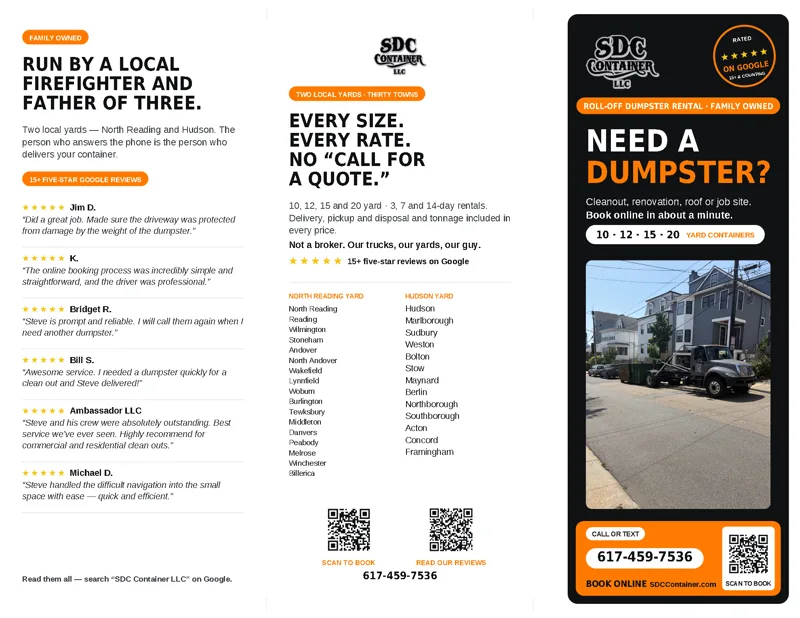
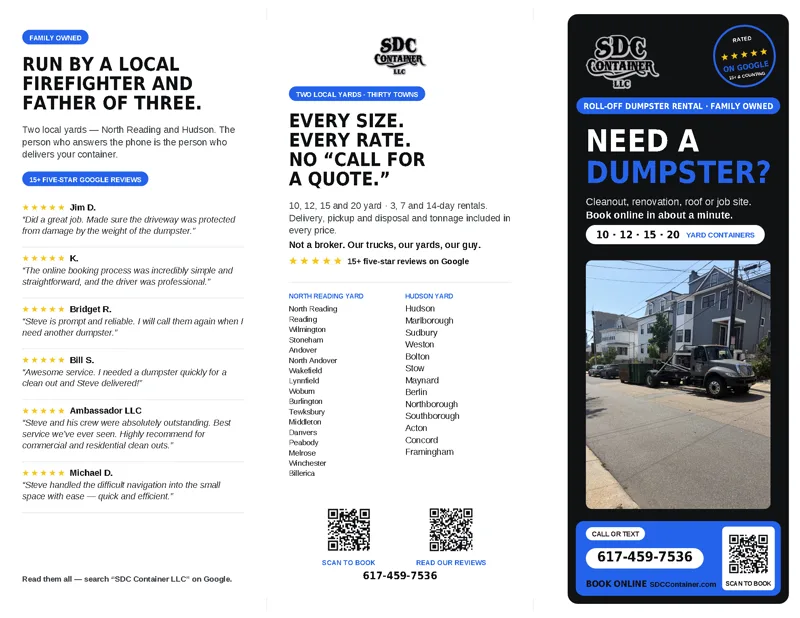
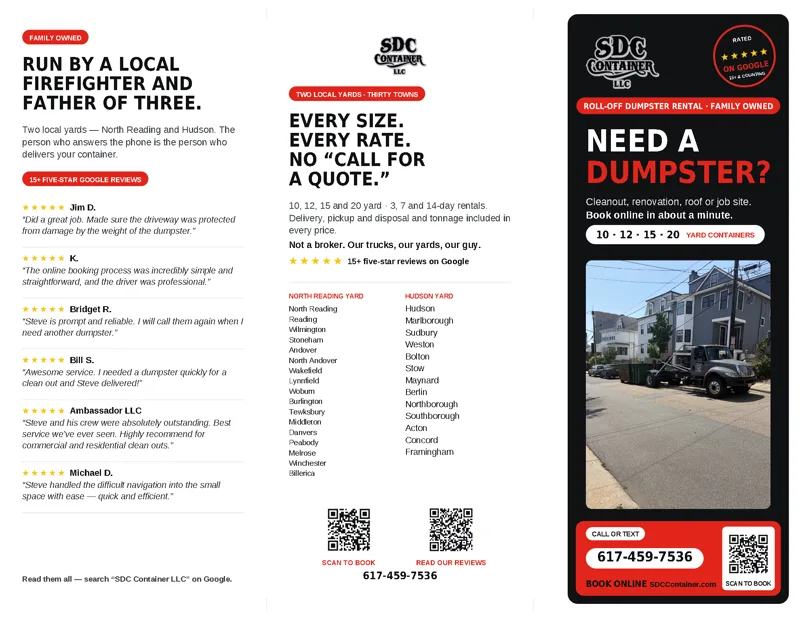
Here is the tri-fold. Give it a spin.
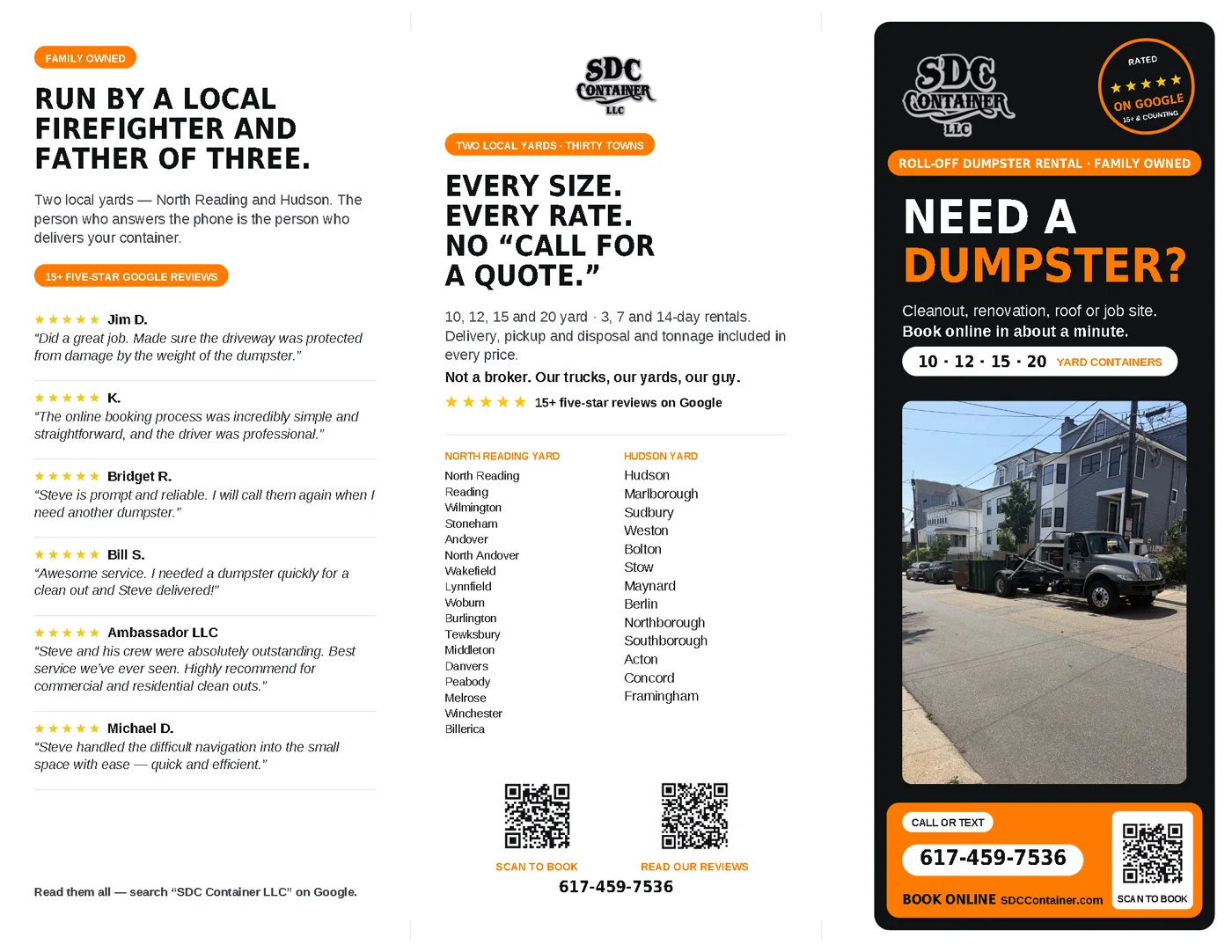
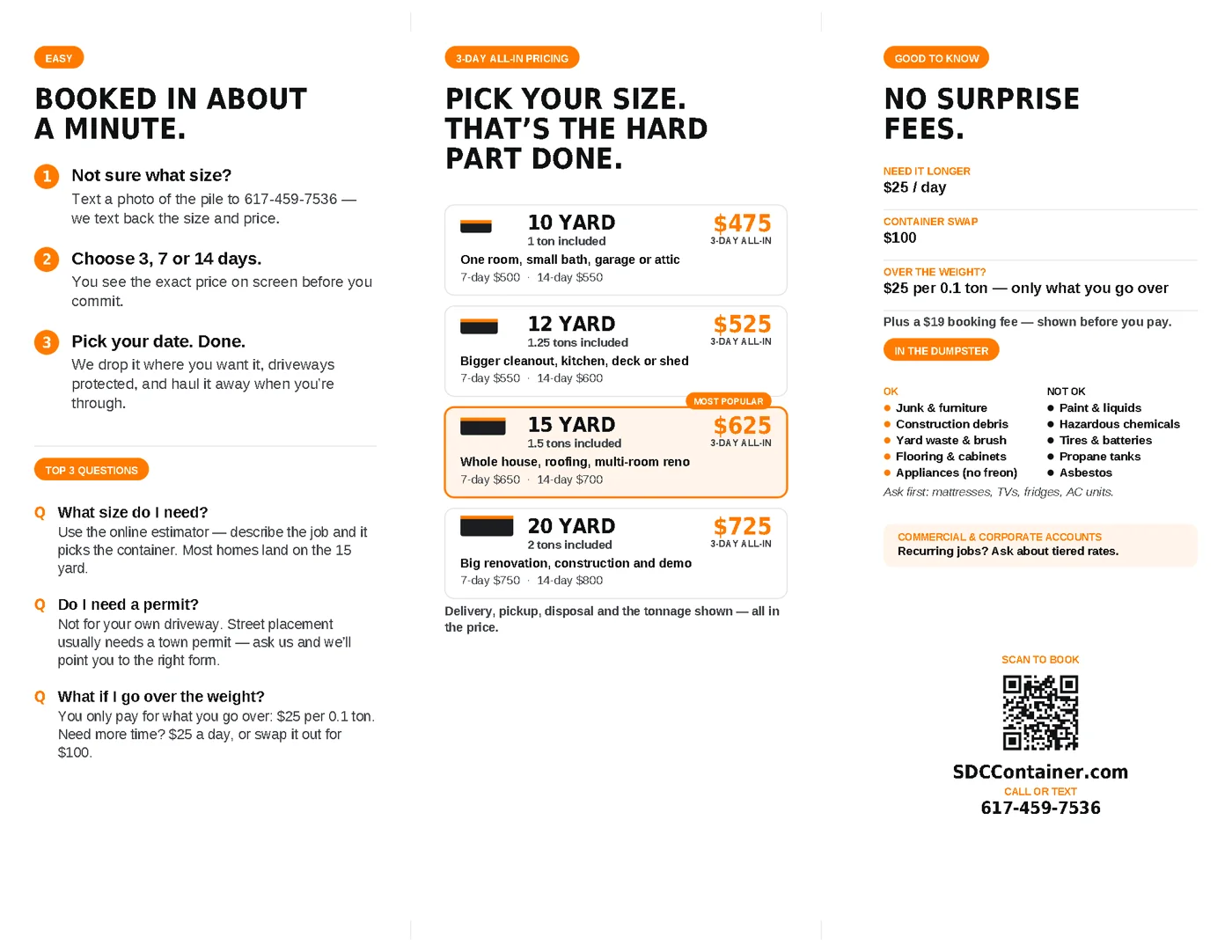
Outside and inside, the September edition. Six five-star Google reviews, both yards and the thirty towns they serve, every rate, and what can and cannot go in the dumpster. Printed on letter stock and on legal, which gives the reviews room to breathe. Open the outside or the inside at full size.
QR code business cards
The front is the number. The back is two QR codes: one books a dumpster, the other opens SDC’s Google reviews. A hazard stripe runs along the bottom edge, in orange, red or blue.





The town mailers
Each Every Door Direct Mail route gets its own edition, with the town on the front and the nearest yard named underneath. Four editions so far: Middleton and North Reading from the North Reading yard, Wayland and Sudbury from Hudson. Designed on the left, printed on the right.




What we delivered
Website. A fast, plain website with no WordPress, no database and no plugins. Web design & development →
Online booking with Stripe. Four steps, live pricing, hosted card payment, and a complete work order by email on every paid order.
Dispatch app. A private board for the office and a phone app for the drivers, from paid to picked up.
QuickBooks automation. Payments land in the books against the right accounts. Nothing is typed twice.
Local SEO. Service and town pages for the searches people make when they need a container. SEO & content marketing →
Print to match. Tri-fold brochures, QR code business cards and town editions of an Every Door Direct Mail flyer, from the same kit as the site.
Ongoing support. The site, the booking page, the dispatch app and the business’s wider technology under one arrangement. Managed IT & support →
Common questions
Very likely. The first step is a short call to work out what your business actually books: a container, an appointment, a piece of equipment, a delivery slot. That shape decides the build. If an off-the-shelf tool would serve you better, we will say so and point you to it.
It depends on what is being booked and what it has to connect to, so we quote after that first call rather than publish a number that would be wrong for most people. The quote is fixed and itemized before any work starts. A simple booking page and one that ties into dispatch and accounting are different projects, and you should not pay for the second if you need the first.
From a phone, a tablet or a desktop. It is a handful of taps, and the whole site follows at once. Steve has updated pricing from the cab of his truck. Sizes, rates, included tonnage, delivery windows, blackout dates and fees all live in one place.
Yes. The card form belongs to Stripe, so card numbers never touch the website or its server. Every order is checked and priced on the server before payment, so nothing can be changed in the browser.
The customer pays on Stripe’s page, the owner gets an email work order with the date, window, container, term, address, placement notes and price breakdown, and the rental appears on the dispatch board with its delivery and pickup on the calendar. Nobody types anything twice.
They book the wrong thing. Scheduling tools book a person’s time in slots. This business books a container of a specific size, on a date, for a term, at an address. Forcing one shape into the other is what created the original mess.
Related: Rebuilding a WordPress site without WordPress · IT for trades & contractors · Web design & development.
Does your site take orders?
Prefer to pick a time? Book an appointment →
Or call (978) 885-1819 If we’re on a job, leave a message and you’ll hear back the same business day.